
Overview page
Interpret KPIs, charts, and alerts.
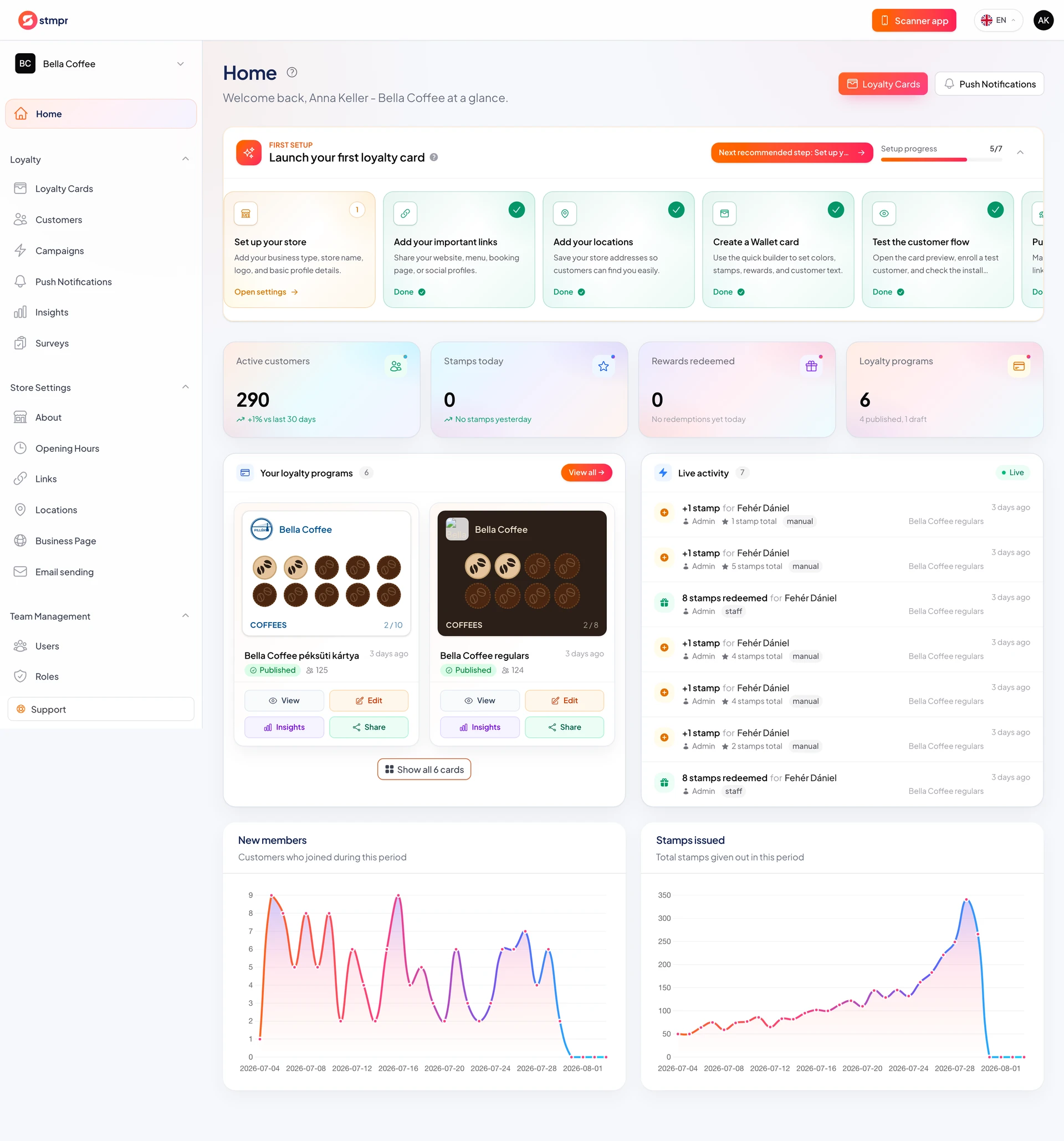
The Home page gives a quick view of loyalty performance. KPIs, charts, and program cards help you see what is happening in your store right away.
From here you jump to card details in one click, and the recent activity list shows stamps and redemptions.
Alerts proactively flag when it is worth sending a notification or mentioning a reward to customers.
https://stmpr.io/dashboard
Why use this?
As a morning routine, Home is enough to spot trends: is enrollment growing, how many customers are close to a reward.
Charts show seasonal patterns over time, useful for campaign planning and timing push messages.
Alerts reduce the chance you miss a redeemable reward or inactive customers.
Step by step
- Open Home in the left-hand navigation.
- Check the top KPI strip: customers, new enrollments, stamps, redemptions.
- Scroll to the charts to see enrollments and stamps over time.
- On the program cards, click a card to open its details.
- Review the recent activity list: who stamped, when rewards were redeemed.
- If an alert appears, click it for the suggested action (for example send a push).