
Publish and share a business webpage
Cards, opening hours, links and locations on your own public page.
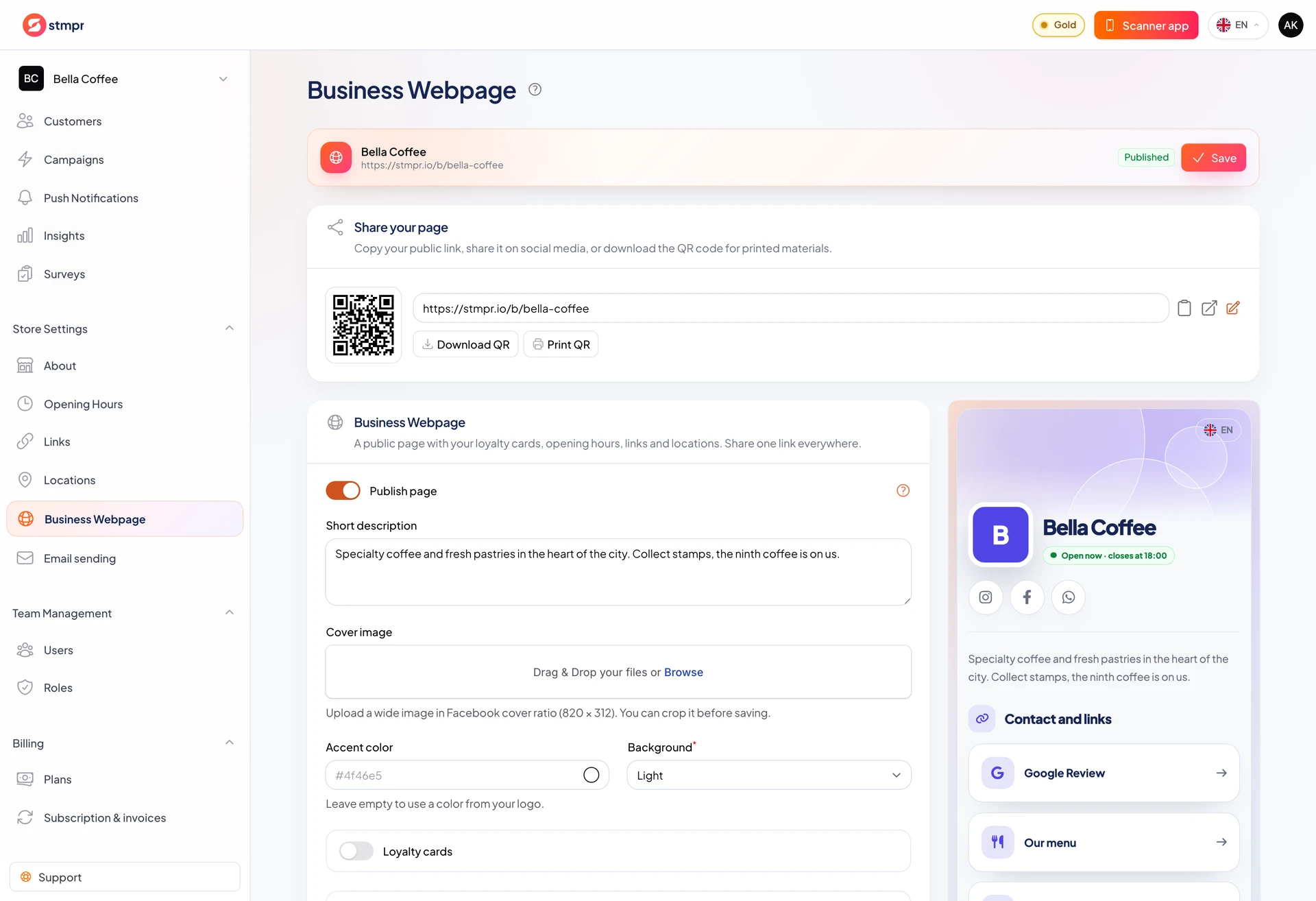
Business Webpage is one public URL for cards, hours, links, and locations.
Choose visible sections and published cards. Add cover image, short description, accent color, light or dark theme.
Editor does not auto-save. Preview, then Save in the header.
https://stmpr.io/dashboard · Business page editor
Step by step
- Complete About, Opening Hours, and Links first.
- Open Business Webpage editor: short description (max 160 chars), optional cover.
- Pick accent, theme, sections, cards; optionally show active public Surveys.
- Preview mobile, tablet, desktop. The preview follows your edits live, so you see each change before saving. The link picker only offers links you set to Active.
- Enable publish and Save.
- Under share block copy link, open page, or download QR.
Publish and share
- Draft works only on signed preview link; publish enables public URL.
- Published page may appear in search.
- Cover, logo, name, and description appear on social share cards.
- Slug can change; old URL redirects but reprint QR after slug change.