
Push target groups
Who should get which message.
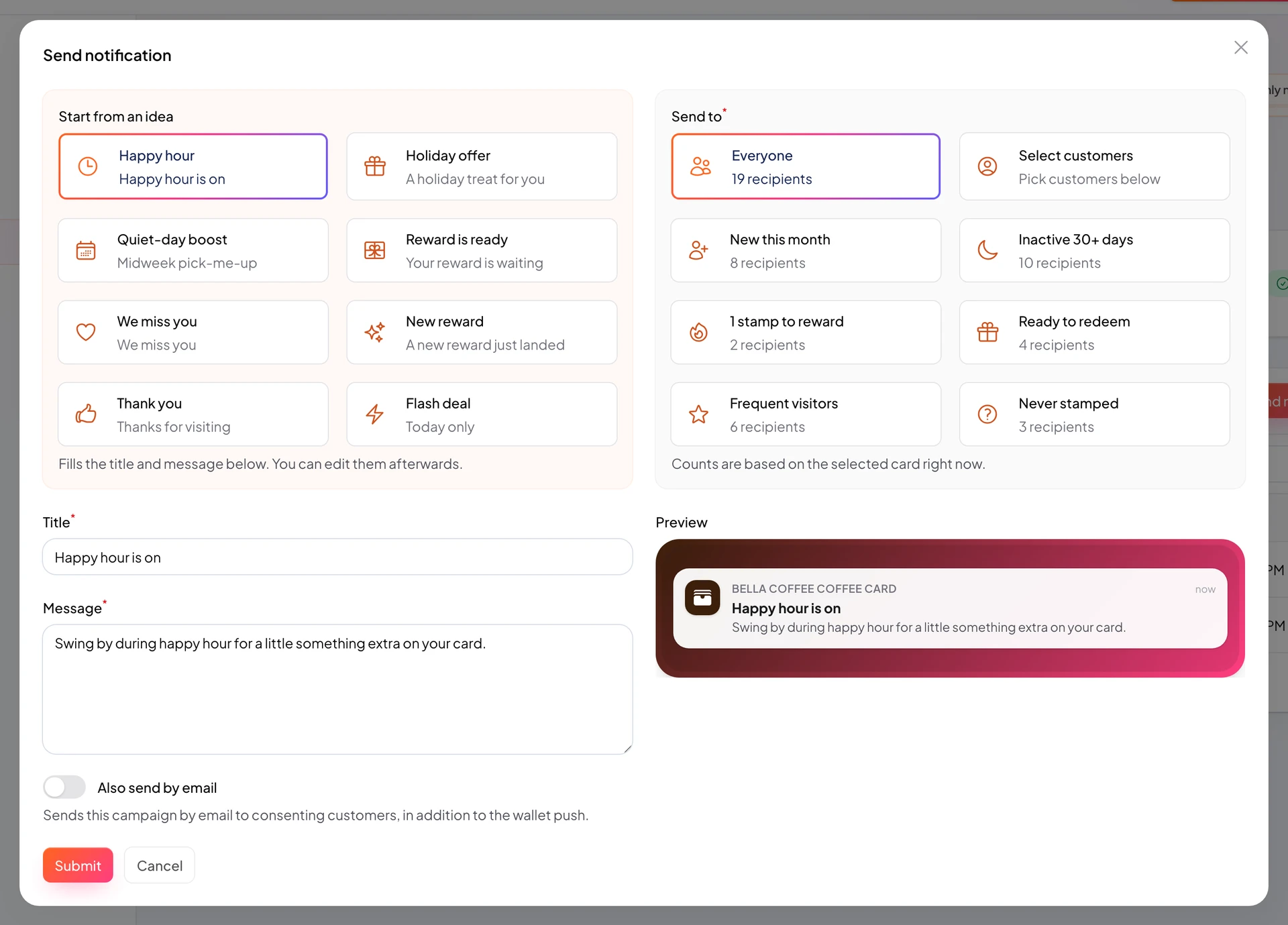
Audiences let you message a slice of customers: inactive, close to reward, new enrollments. Better results, less noise.
When sending push you pick segments based on customer data.
Use “everyone” sparingly, usually for important notices only.
https://stmpr.io/dashboard/notifications · Audience
Why use this?
Relevant copy converts (for example “One stamp left for your free coffee!”).
Winning back inactive customers costs less than acquiring new ones.
Too many pushes lower long-term open rates.
Step by step
- Start a new notification in Push Notifications.
- Pick a segment in the audience dropdown.
- Check estimated recipient count if shown.
- Write copy suited to that group.
- Send and track results in Insights.
Audiences and when to use them
- Everyone: full list, only for major news (hours change).
- Inactive 30 days: win-back (“We miss you!”).
- Close to reward: nudge (“Almost there!”).
- Ready to redeem: urgency (“Come redeem before you forget!”).