
Get started with the control panel
Guided steps all the way to going live.
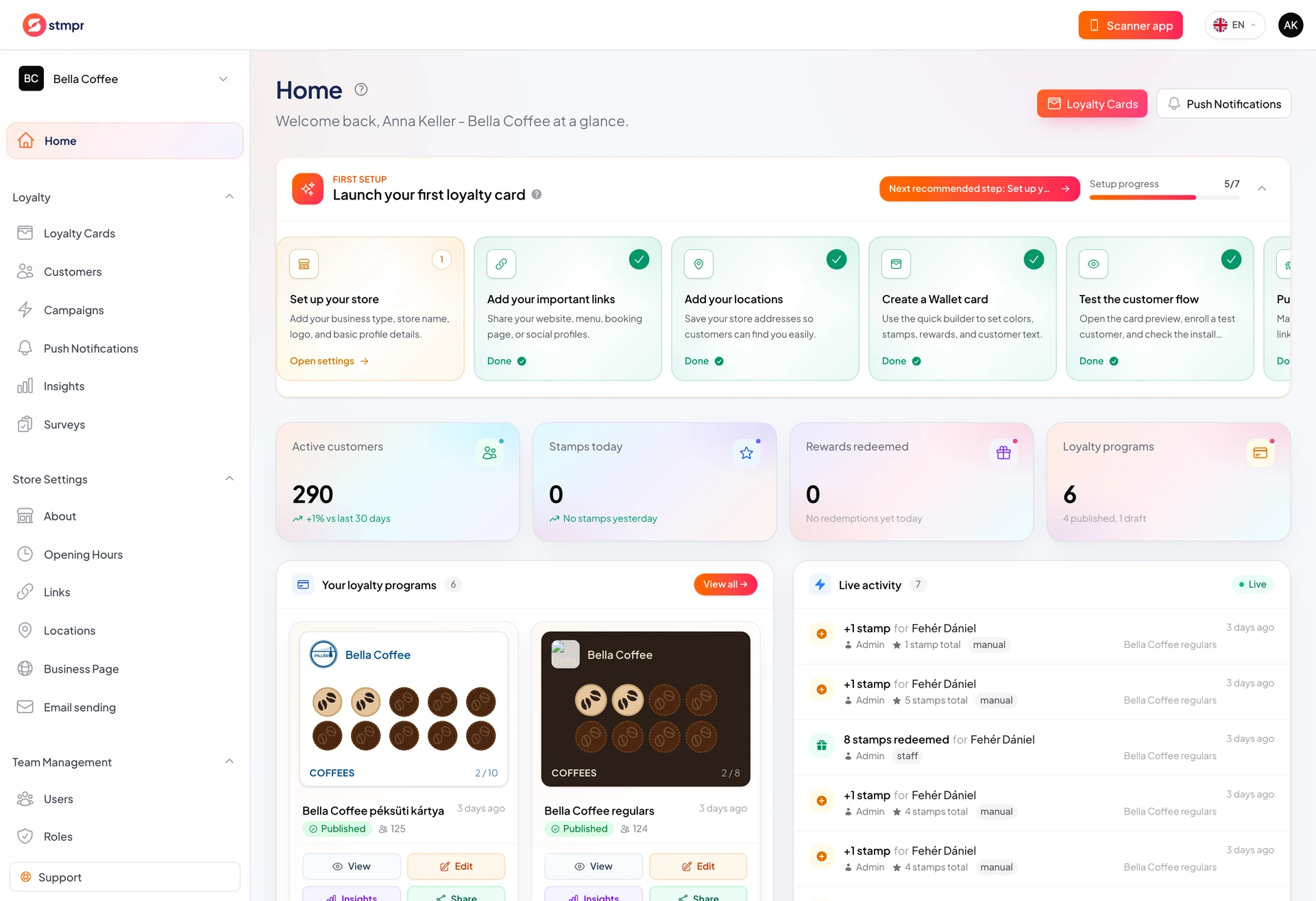
When you create a store, guided steps on Home walk you to go-live. Cards always show the next task so you do not guess order.
Each step is concrete: create a card, customize it, add a location, invite team, publish. Completed steps check off so you see progress.
Steps link to key features so day one feels manageable and nothing critical is skipped.
https://stmpr.io/dashboard · First steps
Why use this?
Most launch delays are skipped steps (no location, card not published). Guided steps prevent that.
You reach the first real customer faster because the next action is always visible.
Team members see the same list by role, which simplifies training.
Step by step
- Sign in and open Home. The first-steps row appears at the top.
- Start with create loyalty card: the step card opens the wizard.
- Customize on Design (logo, colors, stamp icons) and Details (reward and terms).
- Add at least one location if stamping needs a location in the scanner.
- Invite team if you are not alone. Pick roles in the invite.
- Publish the card to get the public link and QR for enrollment.
- When done, collapse the checklist to keep Home tidy.
Good to know
- Steps depend on role. Some tasks need the right permission.
- Order is recommended, but most steps are also available from menus anytime.
- If you leave and return, the checklist continues where you stopped.